 Skip to content
This guide walks you through how to use the rework function in Workshop Software. Follow the steps below to complete this task.
The Rework Function allows you to create a new job for a customer and link it to an existing job/invoice. This can be extremely useful when a customer returns to the shop unhappy about a previous job. Please Note: The Rework Function will not adjust any pricing on the new invoice. 1. Open a job for a customer and click the action menu (star) on the right-hand side 2. Click Rework
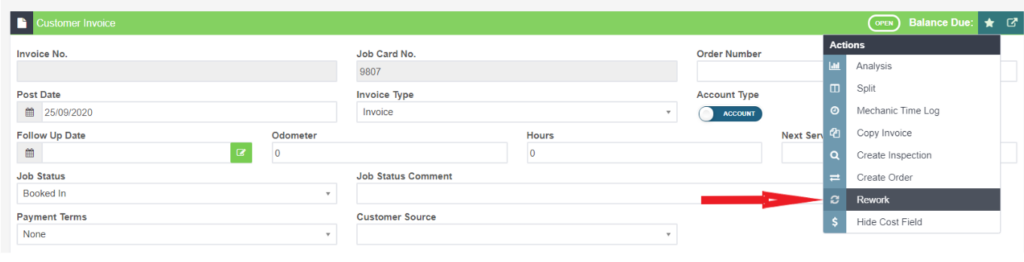 3.Select the invoice that this job will be associated with
 4. Enter the Reason for rework and complaint (if applicable)
 5. Click Save

Good to Know
- Make sure you click Save after making your changes. If you navigate away before saving, your changes will be lost.
Frequently Asked Questions
Do I need a specific subscription level for this feature?
Some features in Workshop Software are available on specific subscription plans. If you do not see the option described in the steps above, check your current plan or contact the Workshop Software team to find out if an upgrade is required.
