 Skip to content
This guide shows you how to convert an open invoice back to a booking in Workshop Software. This is useful when a job needs to be rescheduled or moved back into the booking workflow.
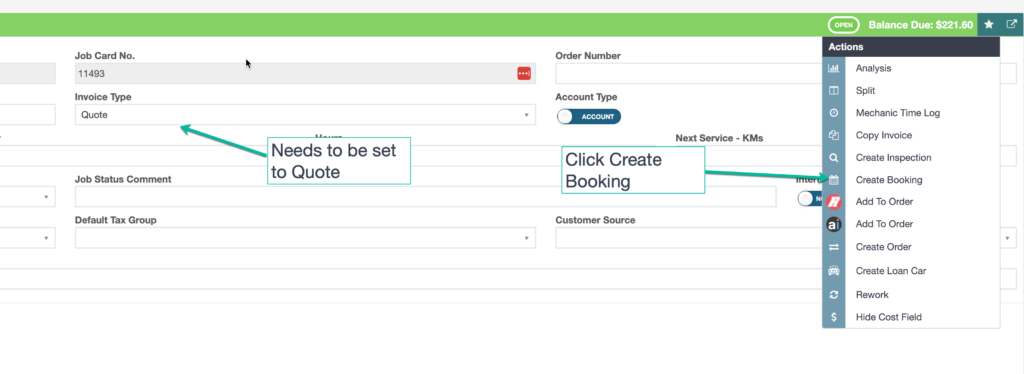
Step 1: Change the Invoice Type to Quote
- Open the invoice you want to convert.
- Change the Invoice Type from Invoice to Quote.
- Click Save.
Step 2: Create a Booking from the Quote
- Click the Star button (action menu) on the invoice.
- Select Create Booking.
Step 3: Confirm the New Booking
- A booking will be created for the open invoice.
- Note that the job card number will change when the booking is created.
Good to Know
- Make sure you click Save after changing the invoice type. If you navigate away before saving, your changes will be lost.
- The original job card number will no longer be valid after the conversion — a new number is assigned to the booking.
- Double-check the details on your invoice before finalising to ensure accuracy for your customer and your records.
Frequently Asked Questions
Can I convert the booking back to an invoice?
Yes, once the booking is opened as a job, you can change the type back to an invoice and continue the workflow as normal.
Will the line items be preserved?
Yes, all products, labour, and notes on the original invoice will carry over to the new booking.
