You can use a barcode scanner to scan parts on to invoices in Workshop Software.
Contents
When entering a product into Workshop Software there are three fields that are searchable and therefore can be used to add a product to an invoice, they are Item Code, Description and Searchable Tag. Searchable Tag does not show on a job card, invoice or stock order so is the best option as the field to hold the barcode details.
Setup your Barcode Scanner
1. Plug your Barcode Scanner into your computer or connect it to your tablet.
2. If this is your first time plugging the scanner into your computer you might have to wait a minute while it sets up the device.
Setup the Products
1. To add a barcode to a product search for and bring up the product details,
2. Click into the Searchable Tag field and using your barcode scanner, scan the barcode on the product. This should insert the barcode number of the product into the field.
3. Then click Save to add the barcode as a Searchable Tag;

Adding Products to Jobs/Invoices
1. To add the product to a booking, job card/invoice, stock order or supplier invoice simply click into the Product field and scan the barcode.
2. The scanner will insert the barcode number into the field.
3. Select the product to add it;

Using the Scanner for Stock Take
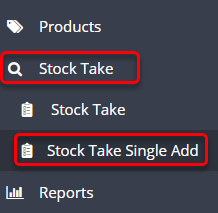
1. To use the barcode scanner to perform stock take, navigate to
Stock Take > Stock Take Single Add.
3. The scanner will input the barcode number into the field. Update the ‘Quantity Count’ field and click Save.

Related Articles
Also Explore
 Skip to content
