 Skip to content
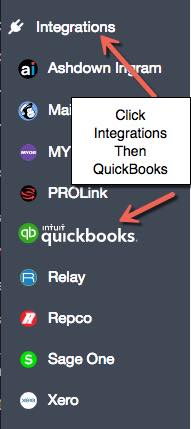 2. Click on “Connect to QuickBooks”. This will start the connection process.
  2a. [Alternate method] You can connect QuickBooks to Workshop Software from the QuickBooks App Centre. Find Workshop Software in the QuickBooks App Centre, then click on the button “Get App Now”
  3. If you chose the connection via Workshop Software, it will ask you if you want to continue to the App Centre. Click “Continue“
  4. You will be re-directed to the QuickBooks App Centre connection. You will now need to click “Authorize” to start the connection process.
  5. Once authorised, you will be returned to Workshop Software, and the QuickBooks setting page will be displayed. You need to make a selection for every field on this page, even if you think you might not use it.
  6. Once you have entered details into all the fields, click “Save”. NOTE: The data shown on this page is an example only and is not necessarily the recommended set-up. Please speak with your accountant or bookkeeper if you are unsure.
  7. The first time you connect to QuickBooks, click on the logo at the top of the screen to sync all your data from QuickBooks. This may take a number of minutes depending on how much data you have in QuickBooks. This will bring over all customers and suppliers from QuickBooks into your Workshop Software system. If you maintain your customers and suppliers in Workshop Software, the system will sync your data automatically, so you don’t need to press the Sync button again. If you change data in QuickBooks, you can press the button to Sync any new data from QuickBooks into Workshop Software.
Related Articles
- How to integrate Workshop Software and Xero
- How to integrate Xero
- How does the QuickBooks integration work?
