 Skip to content
Workshop Software lets you add the online booking diary to instagram bio through your account settings.
The Online Booking Diary gives you the access to an online booking page which you can add to your website and/or social media pages.
Instagram bio has a limited amount of characters so you will find that the whole URL will not fit into the bio space. We suggest you use a URL shortener program like bitly to shorten the URL so that it fits in your Instagram bio space.
How to Copy your Online Booking Diary URL
In the left hand sidebar menu click on Settings (1) then click on Public Booking (2).
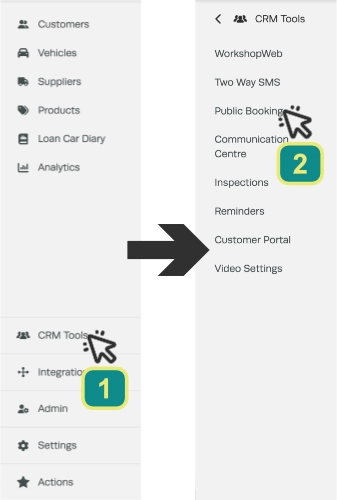
Highlight and copy your public URL.

Open a new web browser and go to: https://bitly.com/ and paste your Online Booking Diary public URL into the ‘Shorten your link’ field. Then click on the ‘Shorten’ button

A shortened URL will now appear in the field. Copy this URL and paste this into your Instagram bio!.
Don’t forget to set up Instagram as a Customer Source in Workshop Software so you can start to track where you are getting new business from!!
Here is a guide on how to set up a customer source in Workshop Software: https://staging.workshopsoftware.com/knowledge-base/settings/setup-customer-sources-in-workshop-software
Good to Know
- Review your settings periodically to ensure they still match your workshop’s current workflow.
Frequently Asked Questions
Where do I find this setting in Workshop Software?
Navigate to Settings in the left-hand menu. The specific option is described in the steps above.
Can I change this setting back later?
Yes. This setting can be changed at any time by following the same steps and adjusting the option as needed. Remember to click Save after making your change.
Can customers see this in the online booking diary?
If you have the public online booking diary enabled, customers can book appointments through it. The settings you configure here control what is available in the internal and/or public diary. Check your online booking settings for customer-facing options.
