 Skip to content
Managing customer records accurately is important for invoicing, communication, and reporting. This guide shows you how to create a limit on an account customer in Workshop Software so your customer information stays up to date.
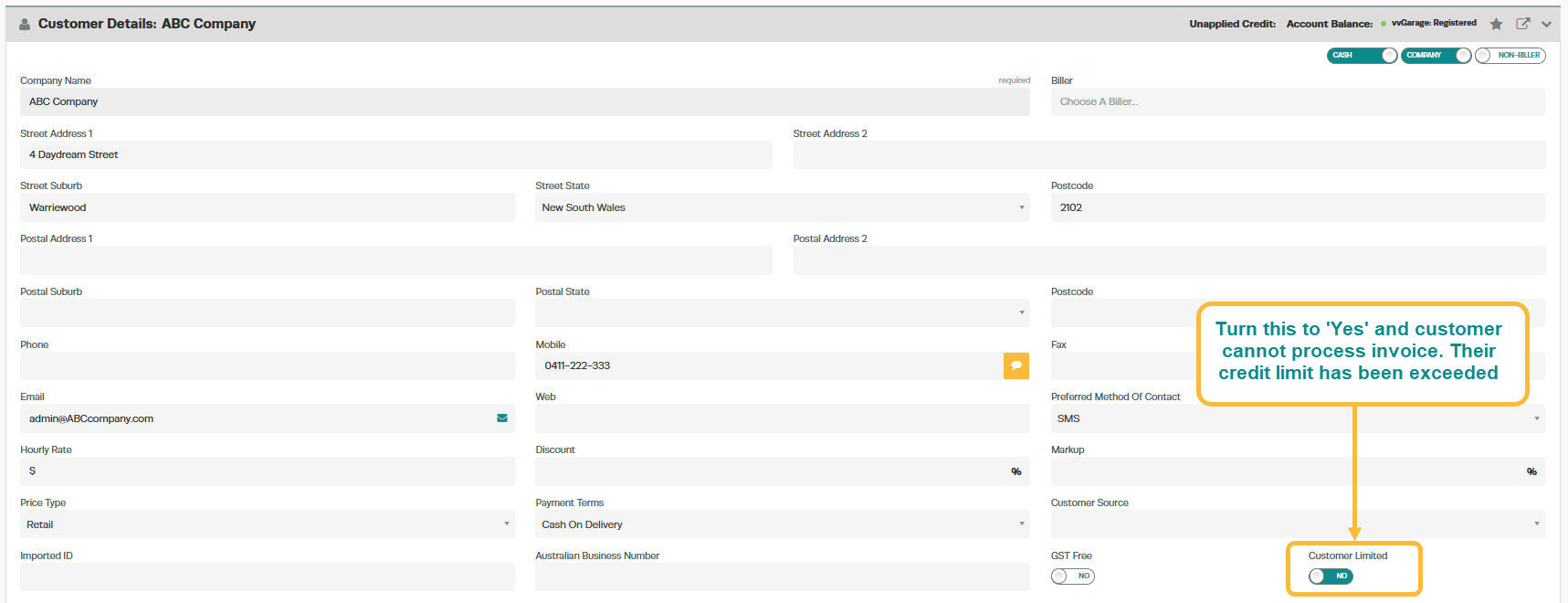
If you have a situation where a customer has not been paying their account off or has reached their limit and you want to stop the customer being able to have any new invoices placed against their account.
To stop the customer from receiving credit, set the ‘Customer Limited’ toggle to ‘Yes’ and click save.
Good to Know
- Make sure you click Save after making your changes. If you navigate away before saving, your changes will be lost.
- The customer account type affects how payments and balances are tracked. Cash customers pay at the time of service, while account customers can be invoiced and pay later.
- This setting can be toggled on or off at any time. The change takes effect immediately once you click Save.
Frequently Asked Questions
Will this change affect existing invoices for this customer?
Changes to customer details (such as name, address, or contact information) apply to future invoices. Existing completed invoices retain the details that were on the invoice at the time it was created.
What is the difference between a cash customer and an account customer?
A cash customer pays at the time of service, so there is no outstanding balance. An account customer can be invoiced and given payment terms, allowing them to pay later. You can track account customer balances through the customer balances report.
Related Articles
- Change your customer from a cash account to an account customer
- Create an account invoice for a cash customer
- Create a cash invoice for an account customer
