 Skip to content
To enter your GST Number so that it appears on customer invoices you first need to ensure that you have New Zealand set as your Country Code. To do this please see the guide titled How to Change Country Code.
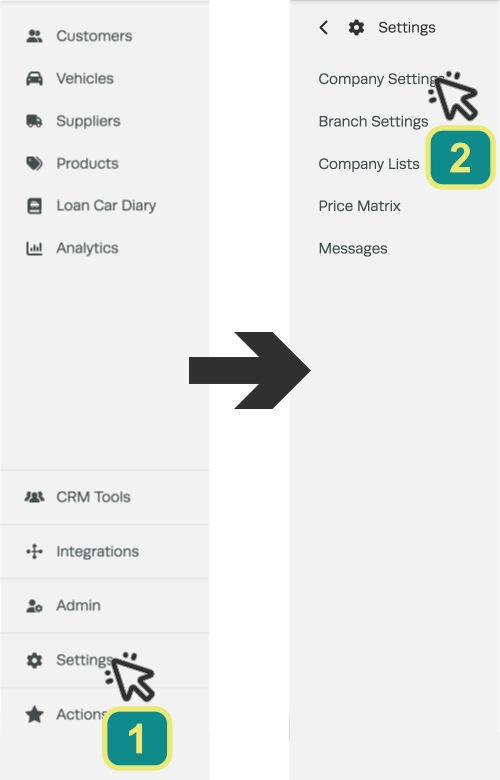
Then to update or add your GST Number click on Settings (1) in the left hand sidebar menu and then click Company Settings (2).
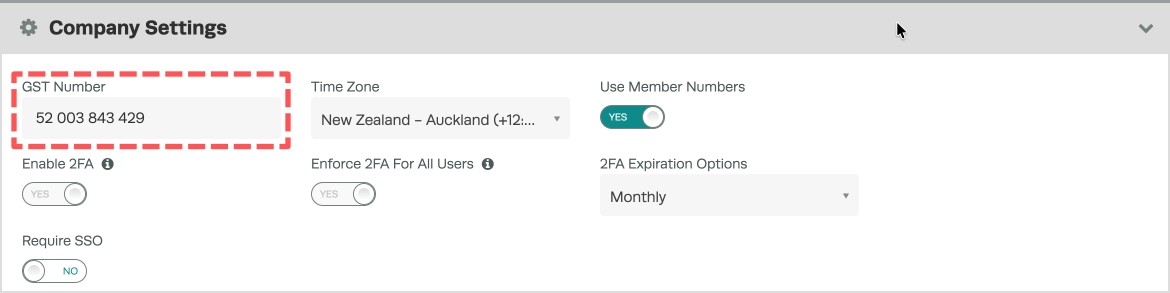
In the Company Settings section enter your GST Number in the GST Number field.
Scroll down to the bottom of the page and click the Save button in the lower right hand corner.

3. Your GST number will now show at the top of all customer invoices;

Good to Know
- You can find this option under Settings > Company Settings in the left-hand menu.
- Use the date filters to narrow the report to a specific period. This is useful for monthly or quarterly reviews.
- Once the report is generated, you can review the results on screen or use your browser’s print function to save a copy.
Frequently Asked Questions
Can I filter the where do i enter by gst number report by date range?
Yes. Use the date range fields at the top of the report to specify the period you want to review. This lets you narrow results to a specific week, month, or custom date range.
Can I export or print this report?
You can use your browser’s built-in print function to print the report or save it as a PDF. Open the report, press Ctrl+P (or Cmd+P on Mac), and choose your printer or select Save as PDF.
