Skip to content
Integrating MYOB – Adding a new product using the Supplier invoice with Workshop Software connects the two systems so data flows between them without manual entry. Once set up, this integration saves time and reduces the chance of errors when working across platforms. Follow the steps below to configure the integration.
Issue: There has previously been an issue where, if you add a part to MYOB using Workshop Software’s Supplier Invoice screen, that it doesn’t update the stock level in MYOB. Reason: The reason this occurs is because, when a part was previously added to Workshop Software, whether it was through a supplier invoice, or a workshop invoice, it would add the part, but not tick “I Inventory This Item” in MYOB’s inventory system. If this box isn’t ticked, then the stock won’t update when the part is added to the system. Resolution: As of 29/03/2016, Workshop Software now gives you the ability to tick this box when adding the product. To do this, follow the guide below: 1) Go to Integrations -> MYOB 2) Select the switch on “Inventory New Items – Supplier Invoices” to “Yes”
 3) Select an Account in the Inventory Account box
  4) Press “Save” to save your changes. This will now pass any new part created in the supplier invoice to MYOB, and will add in the required information, as seen in the screenshot below for a part I added called ER123.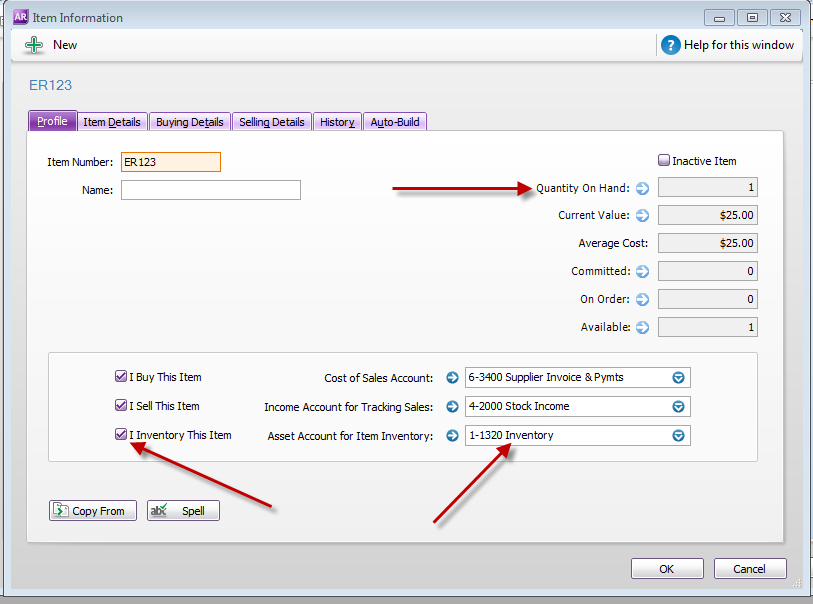
Good to Know
- Make sure you click Save after making your changes. If you navigate away before saving, your changes will be lost.
- If you have an accounting integration enabled, this change will sync to your accounting system on the next sync cycle.
- If you experience any issues during setup, contact the Workshop Software support team for assistance.
Frequently Asked Questions
Will this change appear on the printed or emailed invoice?
Yes. Any changes you make to the invoice content in Workshop Software will be reflected on the printed, emailed, or SMS version that your customer receives.
Can I undo this change to the invoice?
You can update the invoice again by following the same steps. If the invoice has already been finalised or synced to your accounting system, contact your administrator about the best approach.
Will this change affect existing invoices that already include this product?
No. Existing invoices and job cards retain the product details as they were at the time the invoice was created. This change only applies when the product is used on future invoices.
Related Articles
- Error – cannot duplicate invoice numbers for supplier
- Credit a supplier invoice
- Error – cannot duplicate invoice numbers for supplier while using Xero integration