 Skip to content
Managing employee and user settings in Workshop Software controls who has access and what they can do in the system. This guide shows you how to give/limit user access to the sales dashboard.
By default, all users have access to the Sales Dashboard in Workshop Software. However, there is a function available that allows you to restrict user access to the Sales Dashboard if needed. If you have Admin access, follow these steps to manage user permissions: Go to admin Users
Users
 2. Click on the green ‘pencil’ icon for the corresponding username that you wish to limit their access to the sales dashboard
 3. Under Dashboard Privileges, toggle the setting to Limited to restrict access to the Sales Dashboard.
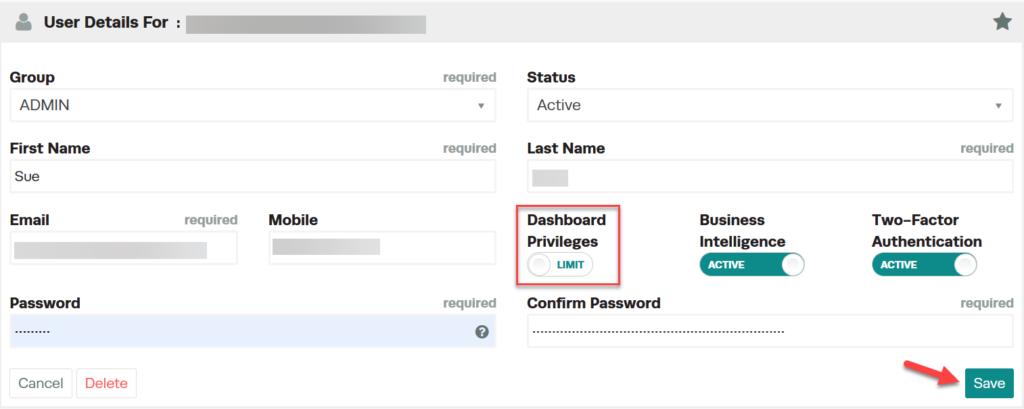 This user will not have access to see:
- Today’s sales
- Past week’s sales
- Past month’s sales
- Analysis charts (inc. sales, performance, hours and product details)


Please note: if you want your 2nd Admin user or sub-user to NOT see the Sales Dashboard, you can remove their access by clicking the ‘Dashboard Privileges’ toggle to LIMITED.
Good to Know
- This feature is also available on the Workshop Software mobile app if you have mobile access enabled on your account.
Frequently Asked Questions
Do I need a specific subscription level for this feature?
Some features in Workshop Software are available on specific subscription plans. If you do not see the option described above, check your current plan or contact the Workshop Software team.
