 Skip to content
The sales by payment method report in Workshop Software helps you review and analyse your sales by payment method data in one place. Running this report gives you a clear snapshot that you can use for business decisions, record keeping, or end-of-period reviews. Follow the steps below to run this report from the Reports section.
The Sales by Payment Methods report provides a list of all payments taken within a date range, grouped by the method of payment. The report shows the invoice number, payment date, customer name and payment amount. 1. To run the report, click on ‘Reports’ from the menu options on the left hand side and then click on ‘Business Reports’;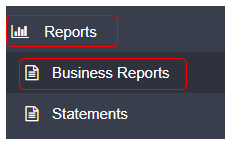 2. Click on the arrow icon to the far right of the blue Sales Reports menu to expand the menu;
 3. Enter the date range you want the report to cover and then click on the ‘green printer’ icon at the far right to generate the report, the report will open in a new tab and can then be printed;

Good to Know
- You can print, email, or SMS the invoice to your customer once it is ready.
- Use the date filters to narrow the report to a specific period. This is useful for monthly or quarterly reviews.
- You can print or export the report results for your records or to share with your accountant.
Frequently Asked Questions
Can I filter the sales by payment method report by date range?
Yes. Use the date range fields at the top of the report to specify the period you want to review. This lets you narrow results to a specific week, month, or custom date range.
Can I export or print this report?
You can use your browser’s built-in print function to print the report or save it as a PDF. Open the report, press Ctrl+P (or Cmd+P on Mac), and choose your printer or select Save as PDF.
Can I undo this change to the invoice?
You can update the invoice again by following the same steps. If the invoice has already been finalised or synced to your accounting system, contact your administrator about the best approach.
