 Skip to content
Workshop Software lets you change your country code in workshop software through your account settings. Adjusting this setting ensures your workflow matches the way your workshop operates. The change takes effect immediately once saved. Follow the steps below to update this setting.
Workshop Software is designed to work in any country in the world.
Based upon the country settings that you choose, the system will behave differently. For example, if you choose USA as the Country Code, then all the US States will be available in the address details and phone numbers will be formatted according to USA phone formats. If you choose New Zealand, there will be a WOF reminder option and setting in the vehicle section. There are many more examples of specific country settings.
1. Click on the ‘Person‘ icon at the top right of the page and then click on ‘Company Profile’ from the dropdown box;
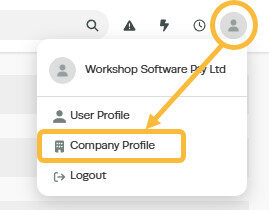
2. Click on the dropdown box under ‘Country Code’ and select the correct country from the list;

3. Click ‘Save’

Good to Know
- You can find this option under Settings > Company Settings in the left-hand menu.
- Make sure you click Save after making your changes. If you navigate away before saving, your changes will be lost.
Frequently Asked Questions
Where do I find this setting in Workshop Software?
Navigate to Settings in the left-hand menu. The specific option is described in the steps above.
Can I change this setting back later?
Yes. This setting can be changed at any time by following the same steps and adjusting the option as needed. Remember to click Save after making your change.
Related Articles
- Change the language settings in Workshop Software
- Access and change your subscription details
- How to change your password
